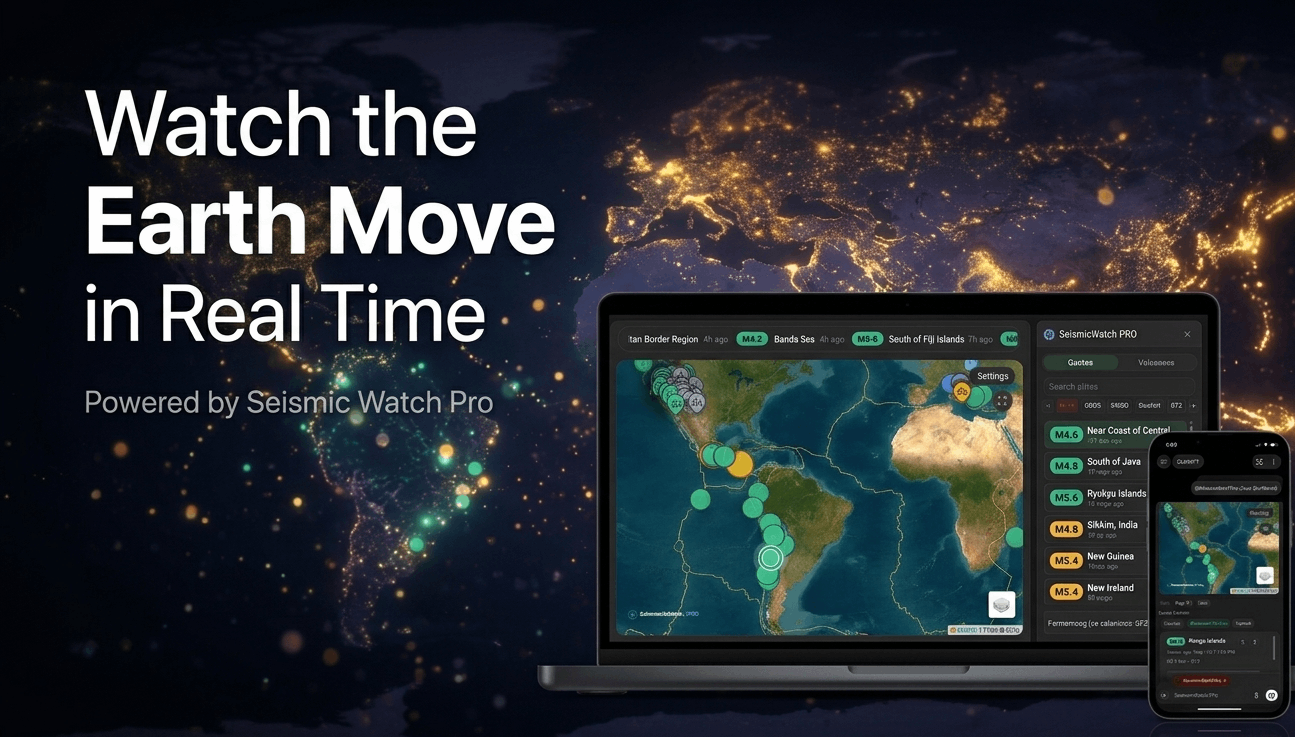

Seismic Watch Pro is a real-time earthquake, tsunami, and volcano monitoring app built for ChatGPT. It brings live seismic feeds, an interactive global map, fault-line overlays, volcano status, tsunami bulletin context, configurable alerts, and natural-language controls into one focused monitoring workspace.
The goal is simple: help people see what is happening on a living planet without forcing them to jump between scattered feeds, observatory pages, maps, and technical dashboards.
Instead of giving every user the same fixed summary, Seismic Watch Pro keeps the live dashboard open and lets users ask ChatGPT for the exact explanation they want. One person may want a plain-English explanation. Another may want scientific detail. Another may want regional context. The app is built for that kind of flexible exploration.
A Live Seismic Dashboard Built For Fast Awareness
Open Seismic Watch Pro and the first thing you get is a live monitoring dashboard. The map, event list, summary cards, filters, and ticker work together so users can quickly understand what is happening now.
The earthquake dashboard supports multiple live and near-live sources:
- USGS
- EMSC / Seismic Portal
- GeoNet New Zealand
- BMKG Indonesia
- GEOFON GFZ
USGS includes dedicated time windows for hour, day, week, and month views. Other feeds provide their own live or near-live event coverage, giving users a broader look at global seismic activity.
Users can:
- switch feed sources
- choose USGS time windows
- filter by minimum magnitude
- sort by time, magnitude, or depth
- isolate significant activity
- manually refresh
- enable auto-refresh
- search by place
- focus the map from the list, map, or conversation
The interface is designed for quick scanning. The toolbar keeps controls compact, the filter strip is easy to move through, and the event list stays connected to the map so users can move from a global view to a specific event without losing context.
A Map That Acts Like A Control Surface
The map is not just decoration. It is the main control surface for the app.
Users can click a quake, select an item from the list, or ask ChatGPT to move the map by place, coordinates, or event. The dashboard updates in place instead of restarting the experience.
Examples:
- “Focus the map on Japan.”
- “Show me Alaska.”
- “Zoom in on this quake.”
- “Inspect the strongest event.”
- “Move the map to Chile.”
The map experience includes zoom controls, fullscreen viewing, multiple basemap styles, selected-event highlighting, volcano overlays, and fault-line overlays. That makes the app feel more like a monitoring console than a static feed reader.
Seismic Watch Pro also keeps users inside the product. It can mention the source of a feed or detail, but the normal workflow does not push users out to external feed pages just to continue exploring.
Earthquake Details Without The Clutter
Most earthquake tools stop at magnitude, location, and time. Seismic Watch Pro goes deeper without turning the interface into a wall of raw data.
Select an earthquake and the detail view can show:
- magnitude
- magnitude type
- depth
- location
- event time
- updated time
- status
- significance
- tsunami flag
- felt reports
- coordinates
- source
- scientific measurements when available
For stronger or richer events, the app can surface deeper context such as intensity, station counts, phase counts, ShakeMap-style motion metrics, uncertainty values, moment tensor information, waveform context, and science-product context when available.
This is also where ChatGPT becomes useful. Users can ask for the specific kind of explanation they want:
- “Explain this quake in plain English.”
- “How unusual is this compared with nearby activity?”
- “What does the depth mean?”
- “Is this likely related to a subduction zone?”
- “Summarize the most important details.”
That turns the dashboard from a passive feed into an interactive seismic workspace.
Built-In Analysis For Real Context
Seismic Watch Pro does more than list events. It compares a selected quake against the active feed window and helps users understand where that event fits.
The analysis layer can include:
- rank within the current feed
- percentile strength
- depth classification
- estimated energy release
- TNT equivalent
- modeled P-wave and S-wave timing
- recent activity timeline
- depth comparison
- median magnitude
- median depth
- event rate
- nearest-neighbor distance
- cluster context
- strongest-event energy share
The charts are interactive, and the selected event remains connected across the dashboard. Users can move from list to map to detail to analysis without losing context.
Volcano Monitoring In The Same Workspace
Volcanoes have their own full workflow inside Seismic Watch Pro.
Users can switch into volcano monitoring and browse current volcano status using searchable lists, status filters, sorting controls, map context, and detail panels.
The volcano experience can include:
- alert level
- aviation color code
- current status
- observatory
- hazard rank
- elevation
- monitored or elevated status
- latest notice type
- coordinates
- recent notices
- eruptive context
- field notes
- aviation advisory context
- webcam or observatory media when available
This makes the volcano side of the app feel like a real monitoring mode, not an afterthought. Earthquakes, volcanoes, and map context live in one place.
Observatory Media With Practical Controls
When media is available, Seismic Watch Pro can show observatory visuals such as still images, animated webcams, video loops, frame sequences, and embedded live sources.
The app treats that media as part of the monitoring workflow. Users can play, pause, stop, scrub timelines, switch feeds, view timestamps, and open media fullscreen.
That matters because volcano monitoring is often visual. A status line is useful, but a current image, animated sequence, or observatory view can make the situation much easier to understand.
Alerts That Are Simple To Understand
Seismic Watch Pro uses three practical sound tiers:
- minor
- moderate
- major
The minor sound is for lower-level awareness, the moderate sound is for stronger activity, and the major siren is reserved for the highest tier.
Users can control whether alerts are enabled, adjust the magnitude threshold, test alert sounds, enable optional voice playback, and manage regional watchlists.
Regional watchlists are useful for people who care about specific areas. Users can follow preset regions such as Japan, Alaska, Chile, or the Ring of Fire, or create their own custom region or place watchlist. Each watchlist can have its own threshold and voice behavior.
This gives users a better balance: broad global monitoring without losing focus on the places they actually care about.
Browser Speech For Hands-Free Monitoring
Seismic Watch Pro uses browser or device speech playback for voice features. That keeps the experience immediate and avoids unnecessary server-side audio weight.
Users can have the app speak earthquake details, volcano updates, eruptive context, aviation status, and field notes when they want a more hands-free monitoring experience.
The speech system is intentionally practical. It helps users monitor activity without turning every update into a long narration.
Built For Conversation, Not Just Clicking
The dashboard is visual, but the ChatGPT connection is what makes the app different.
Users can interact by clicking, filtering, searching, and selecting. They can also use natural language:
- “Open Seismic Watch Pro.”
- “Summarize current earthquakes.”
- “Focus the map on Japan.”
- “Show significant quakes.”
- “Tell me about this quake.”
- “Show volcano status.”
- “Open details for an elevated volcano.”
- “Enable alerts above magnitude 5.5.”
Where possible, the app updates the current dashboard in place. Map movement, event details, overlay loading, volcano views, summaries, and alert changes feel like one continuous session.
That is the point. Users should not have to choose between a live dashboard and a conversation. Seismic Watch Pro gives them both.
Why Seismic Watch Pro Feels Different
Seismic Watch Pro is built around live monitoring, not static lookup.
The dashboard gives users a fast way to scan global earthquake activity, inspect individual events, follow volcano status, view map context, and manage alerts. ChatGPT adds the conversational layer, so users can ask for explanation, comparison, focus, or summaries without leaving the monitoring flow.
The app keeps the experience focused. Feed sources are referenced clearly, but users are not pushed out to external pages just to continue exploring. Alerts are simple enough to understand quickly, with minor, moderate, and major sound tiers. The map is central to the workflow, with zoom controls, fullscreen viewing, selectable events, volcano overlays, and fault-line context.
Seismic Watch Pro is not a replacement for official emergency systems. It is an informational monitoring tool for awareness, exploration, and context. In an emergency, users should always follow local authorities, civil defense agencies, tsunami warning centers, and official public safety guidance.
But for people who want to watch seismic activity unfold, compare events, inspect volcano status, and understand what is happening without bouncing across a dozen different sites, Seismic Watch Pro brings it together.
When the Earth moves, Seismic Watch Pro helps you see it, follow it, and understand it.
-Cire